
UX (User experience)
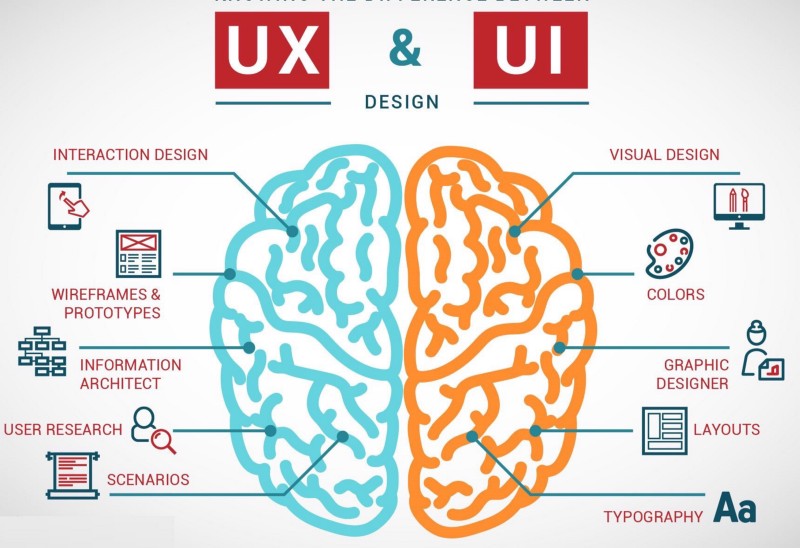
User experience is a process aim to increase customer satisfaction using the product by improving its functionality and usability, providing an easy-to-use product, ensuring “pleasant” interaction between the customers and product satisfaction. Of course, the effect of this is to create a group of loyal customers for the product. A nice definition, however, completely ignores any reference to the UX designer’s technique, tools or responsibilities.
The task of the UX designer is to examine the needs, to know what the future user actually expects and to deliver a product with intuitive, even natural handling. Therefore, he deals with human-centred design.
Here are the five levels of UX designer responsibilities, here related to the digital product, but it can be successfully translated into any plane.

Frequently used symbols of the iceberg, in the UX also works because it is the most accurate.
What you see, or the visual effect of Designer’s work – it is only the tip of the iceberg, the rest of the processes the main part are hidden mostly under the surface. They should be aware of them and pay great attention to them because they determine the entire success of the project.
UI (User interface)
User interface mainly deals with building communication between the user and the machine, the program. It means that it is responsible for the preparation of such elements as the visible structure of the page, menu, content distribution, graphic layout, photo galleries, etc. An important aspect of UI work is the optimisation of the tools used by the user, using the website or application – these include a control panel, navigation, or even an external or electronic keyboard. Generally speaking, the most important task of the UI is to create an aesthetic and functional product.
Conclusion
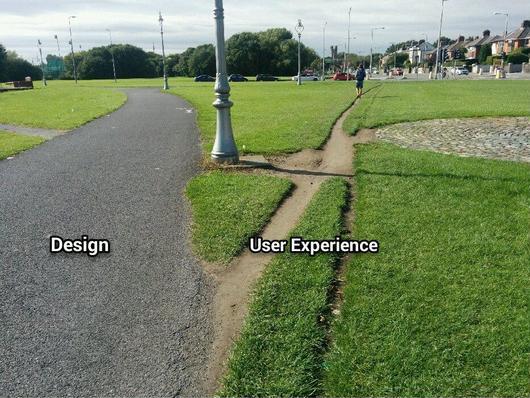
As we can see, UX and UI differ from each other, but both are complementary. An application that looks great but is difficult to use is an example of a good UI with a weak UX. Meanwhile, when something very useful looks terrible, it is an example of a great UX and a weak UI. When creating software, do not make a mistake, which is shown in the picture below:
Source:
 Rafal Web Design Blog
